≡ Menu

Purple PT Cruiser & Purple Chevy S10 Pickup

purple PT Cruiser

Purple PT Cruiser I saw last weekend. Can’t get much better than this!

purple pickup truck

My Friend Jessica Ivins’ dad’s purple truck

These are two different shades of purple but I’ll take it! I captured the PT one myself at a local festival, and local friend Jessica Ivins sent in the truck pic from her parents’ house, somewhar up in dem hills. I’d be proud to drive either one.

1 comment

As of this writing, the picture below has been shared almost 72,000 times on Facebook. It was posted less than 2 days ago.

cheater

this dude is in trouble…

What you’re looking at is the inside of a commuter train car. A white male in the 25-50 range is sitting two rows ahead of  and facing the iphone-wielding fellow passenger. Above the man’s head is a promotional poster with a woman riding in a train car, with a large caption that says “Joy Rider.”

The original poster put these words along with her photo:

“If this is your husband, I have endured a 2 hour train ride from Philadelphia listening to this loser and his friends brag about their multiple affairs and how their wives are too stupid to catch on. Oh please repost …”


It’s all so perfect, we can’t help but share it. I personally couldn’t resist.

This guy could sue the original post owner and me, perhaps, for libel. He’d have to prove damages to win damages, I hear, but if this post does the job the iphoneographer wanted it to, then this man’s already-existing marriage woes will definitely come to a head. I don’t know. I’m not a lawyer. People can sue anyone for anything.

Will ubiquitous cameras reign in our society’s deteriorating public manners? I doubt it. If we use the NRA stance as a comparison, we can see that more guns in an area doesn’t at all deter or diminish crime rates. In fact, it does just the opposite. Lots of guns=heavy crime area. Of course that could be a chicken/egg argument, but I don’t think it is. More guns equals more violence, because the general public just aren’t all that responsible handling firearms. Plain and simple.

Journalists have been decrying the “democratization” of the news. Everyone’s a photographer, publisher, writer. “News” as an institution has been forever rocked. They say that the general public isn’t all that responsible handling news media. And the pen, my friends, is mightier at times than an Uzi. What to do?

As I mentioned before, the courts will be busy for the next few decades working this stuff out. But the court of public opinion on the subject is still reviewing evidence. What say you about this woman’s post? Delicious secret vengeance? Oppressed women comradery? Or libel waiting its day in court?

14 comments

Received these very well designed spam/phish attempt in my yahoo mail in the last week:
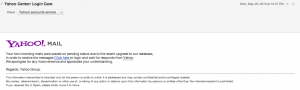
A screen shot of a spam phish attempt that looks like it came from Yahoo.

Branding, typeface and coloring all are used in the attempt to trick us into following links. (click to embiggen)

Here’s the text (with the bad link stripped):

Your two incoming mails were placed on pending status due to the recent upgrade to our database,
In order to receive the messages Click here to login and wait for responds from Yahoo.
We apologies for any inconvenience and appreciate your understanding.

Regards, Yahoo Group.


The information transmitted is intended only for the person or entity to which it is addressed and may contain confidential and/or privileged material.
Any review, retransmission, dissemination or other use of, or taking of any action in reliance upon this information by persons or entities other than the intended recipient is prohibited.
If you received this in Spam, please kindly move it to inbox.

The second phish attempt, same URL (stripped again):

In the last few days, our security Team observed multiple logons to your account, from Different Blacklisted I.P addresses, therefore we are Issuing this security warning. To prevent further unauthorized access for your safety, we have decided to put an extra verification process to ensure your account security.You are therefore required to verify your account.
 

CLICK HERE TO VERIFY YOUR ACCOUNT

 
Customer Care Team
Case number: 1097654

Yahoo!Copyright © 2011 Yahoo! Inc. All Rights Reserved.


I have to admit, I was almost fooled. Both phish attempts are pretty convincing.

(By the way, I love the first spam’s last line in the small print that tells us to “kindly move it to inbox.” The unusual grammar sprinkled throughout, notably with odd use of  “to inbox” instead of “to your inbox,” plus the capitalization of “Spam” and not “inbox,” are other hints that this message is spam.)

But why didn’t I click? And how can you learn to stay safer in the midst of dangerous links, too? I’m going to let you in on some insider geek info and tell you how you can identify these scams immediately.

HOW TO NOT CLICK ON SPAMMY LINKS

I didn’t click on the link for two reasons:

  1. I’m not tired, and I was able to take a pause instead of automatically clicking push through another task before taking a break.
  2. I’ve worked to develop and maintain healthy browsing habits.

If you are tired or have harmful email habits, you will click on these spammy links every time.

You can see my other post about How To Avoid Getting Hacked for the healthy browsing habits you need to establish.

Today we’re going to talk about how you can use a small trick to ascertain whether or not a link is legitimate. This is an investigative strategy that only geeks know about, but it’s something you can learn to use too.

HOW TO SPOT DANGEROUS LINKS: USE WHOIS LOOKUP

The “Whois” (pronounced Who Is) command is one of the original Internet commands. Back in the day (and I mean, BACK… like before the 80’s!), when a geek wanted to know who owned a nickname or who owned an Internet site, she would go up to her terminal screen and type in “whois [nickname].” The little electric protocol signals would travel to the [nickname] profile, pull back all the information stored there and then display it to the geek. When the World Wide Web was built on top of existing Internet structures, geeks used the WHOIS protocol to lookup owners of WWW sites. Nowadays we don’t need terminal windows or unix commands to run a whois lookup anymore. We can just find a reliable web-enabled service to do it for free.

So. You have a suspicious link that isn’t too obviously a spammy link. We’ll use a WHOIS lookup to find out more information in order to make our decision on whether or not to click on the link. Pull up that pesky link and follow these steps:

  1. Hover over the suspicious link. Your browser probably has some sort of window that will display the link’s hidden URL. Does the URL look strange? Does it have the company’s site in it or is the link pointing to something totally spammy? e.g., the link text (usually in blue) says “Yahoo Mail” or “Click HERE” but the actual URL is garblygook.madeupstringofnumbers.spammylinks.com/yahoocom. This is a dead giveaway. Forward the email to the fraud department of the company being spoofed. You’re done.
  2. If in doubt but you can’t quell your curiosity, have no fear! You’re thinking just like us geeks. We can’t let crap go, either. We like to dig around the to see what we can find out. We hover over the URL or right-click on it to copy it (making sure not to click on the link). Then we go to a search engine and type in “WHOIS” or we go to our favorite lookup service. Then you paste in the URL (you may have to whittle it down to the word-just-before-the-dot.the-domain-just-after-the-dot, e.g. spammylinks.com instead of garblygook.madeupstringofnumbers.spammylinks.com) and click “search.” All sorts of good information comes up.

Here’s a screenshot of Internic.net’s whois page (click image to be taken to the site):

a screenshot of Internic.net's whois page

The place to paste the suspicious URL is tiny but it will have enough room.


The information you find will probably tip the scales in the right direction if you were wondering whether or not a URL was safe.

Another insider tip: any [VeryHeavilyAdvertisedRegistrar] isn’t usually the go-to registrar for big legit businesses. Big outfits like banks, credit card companies, mega-sites like Yahoo, Hotmail, etc., do NOT use [VeryHeavilyAdvertisedRegistrar]; they have their own registrar companies or they use little-known, private professional registrars. Maybe some small mom-and-pop click-n-mortars registered at [VeryHeavilyAdvertisedRegistrar] because they didn’t know any better, but be suspicious of any spammy link that has [VeryHeavilyAdvertisedRegistrar] as the registrar. In combo with a suspicious-looking link, any [VeryHeavilyAdvertisedRegistrar] reference is just a bad sign in that instance. In other words, if you’ve seen a commercial for or have heard of the registrar, assume the URL registered there is spammy and perhaps dangerous.

OK, there ya go. New geek insider info that will have you wasting time for hours looking up who is listed as owners and registrars for famous websites. Have fun!

And stay safe, y’all.


0 comments
14.5 billion spam emails are sent daily. 2.5% of them are phishing attempts. That is 362.5 million identity theft attempts a day.

Identity theft criminals have many ways to trick you. Using Psychology of technology principles, criminals design clever emails to collect your login details or get you to install malware (i.e., bad software technology containing virus). According to Spam Laws, 362.5 million phishing attempt emails are sent every day.

A phish attempt is a process that aids in identity theft. Phishing emails looks like they are sent by a legitimate company. In reality, the email contains spam links or malware that can lure you into typing in your username and password. Bad guys hope you use the exact same password and userID for your other accounts, because then they use that login ID to steal credit card information, bank account money, etc. I personally get at least 2 or 3 phish attempt emails daily, and those are just the ones that get past my spam filters.

Why don’t geeks ever get fooled by these legit-looking emails?

Keeping their identity credentials secure is a habit for IT professionals. It’s about to become one of your habits too. You’ve heard some of these techniques before, but it’s now time to take action. I know you’ve been lazy, downplaying the risks, etc. We all put our heads in the sand sometimes. But with an expected billion more people on the Internet in the coming years, now is time to wake up and build a habit of safety for you and your family.

5 ways to keep safe online:


  1. Use strong anti-virus software

    This seems like a no-brainer to some of you. You may be surprised to find out how many people have not bought and/or installed any protection on their devices (go ahead, ask people around you). Geeks not only install anti-virus software but also write their own scripts to occasionally sweep their machines for bad stuff. Kaspersky, Norton and Symantec are popular anti-virus services. Buy and install the software if you haven’t already, even if you are on a Mac. It’s easy and worth the money. (Parental control software you can skip, though).

  2. Construct varied and strong passwords

    Geeks sometimes institute password schemes that allow them to have a different password for each site. E.g., categorizing each type of site, adding a sentence to go with it, perhaps adding a date or other number, then initializing the sentence: “Twitter is” + “Social Media Site” + “date 0513” would be a password like this: TiSMSd0513. <- That is a super secure password system that is easy to remember and can be varied for different sites. (Another method: use the same “throwaway” password for unimportant sites that contain no credit card or other info. Just never make that the same as your email password). Remember, it’s OK to write your passwords down on a piece of paper – if you trust the people who are in your living space.

  3. Never click on links in email

    Geeks don’t click on any links that come from companies, because they know companies are savvy enough to deliver information in more secure ways and would never send “please verify your ID (etc)” emails. Instead of trying to suss out which links are legit, most geeks don’t click on any emailed links at all. Geeks go to a browser, type in the company’s URL and login there if they are curious.

  4. Never click on or install attachments

    Geeks figure that important things like legal papers or family photos, etc., will be shared in other, more secure ways. If a company is desperate to get a hold of you, they will not be using only email. Snail mail and phone numbers are still the communication methods of choice for companies. Family photos can be shared via Facebook or Flickr. There just isn’t any reason to click on any attachment in email unless you are waiting on a specific pdf from a specific person, and said person has warned you that an attachment is forthcoming. Geeks know important information will find them, without email. FedEx or UPS for example.

  5. Have a throwaway email address (or three)

    Geeks use multiple email addresses and assign each for different things. I have an email address just for signing up to newsletters and entering contests. I have another email account for general communication. I have yet another one for this blog; I never use the blog email to sign up for anything, so I automatically know any company emails sent to that address are actually phish attempts.

Those are the five main activities that will make vast improvements in your security habits. Another thing I’d like to mention is this: don’t check email when you’re tired or in a hurry. Some phishing attempts can be very clever, as if they were engineered by behavioral experts. It’s easier to fool an exhausted or rushed person. Reading email needs as much of your attention as driving in the snow requires. Lots of bad guys out there are trying to snow you and blind you with your own human faults. Instill few good habits and software automations to get to your destination in one piece.

Stay safe, everyone!


5 comments

Tech in Motion: Stories of Women in Tech Part 1


You can also see these pics on Flickr.

Two recruiting outfits in the area, Jobspring Partners Philadelphia and Workbridge Philadelphia, hosted a fun evening for techies last night. Held at the Quorum Center at 3711 Market St in West Philly, the Tech in Motion speaker series was the first of 2 parts. 5 area women of varying age, experience and backgrounds, gave the audience a quick-view of their career paths in the tech industry. You can check out details and reviews at the Tech in Motion: The Stories of Women in Tech Meetup page.

Speakers:

Some interesting takeaways (for me) from the speakers:

  1. Most of the five women had some start or connection with the education industry in some manner. 
  2. The ladies discovered tech accidentally in college or learned about it later.
  3. Business and tech are intertwined and have a lot of things in common, so the jump between coding and project managing isn’t too long.
  4. None of the ladies even mentioned run-ins with sexism or discrimination against their gender until explicitly asked by an audience member.
  5. Salary negotiation is a skill women must learn and use. Now.

Some possibilities for growth:

  1. Have a hashtag. I realize there are Tech in Motion events all over the country, but we tweeters in the audience were at a loss without a hashtag. I suggest #[Event initials][airport code][year] e.g, #TiMPHL13
  2. A fruit bowl of some sort or something gluten free. My gf friends there and I had nothing to eat.
  3. A reserved round table at the bar downstairs.
  4. Ending earlier to encourage more people to join each other at said table at bar downstairs.
  5. Reading out introductions to the speakers, instead of just saying their names. (You can have the speakers themselves write a two line bio).

All in all, it was a fun night. I had to do a lot of weird family maneuvering to make it, but in the end it worked out. I’m happy the event didn’t start the speakers earlier because I just can’t get downtown by 6 pm most weeknights.

Thanks, JobSpring and Workbridge, especially Nichole Liccio and Melissa Koenig for organizing. Nice to see people-I-only-know-on-Twitter like LeeAnn Kinney and others that are waaaay cooler than me like Lisa Yoder who runs a philly street fashion blog called streetstories.us. Women in Tech conference attendees were present but I also saw a lot of strange faces, which is always a good sign that the Women in Tech community in Philadelphia is growing.

Here’s my Storify of collected pics and tweets from some attendees.

3 comments