≡ Menu

Geeks Who Give: April 2nd, 2009.

Next time I’ll be downtown will be at the Geeks Who Give:: Philadelphia Futures Event on Thursday, April 2nd at Tattooed Mom from 6 p.m. to 9 p.m. Check out this info from the press release:

“On Thursday, April 2nd, Geeks Who Give, a civic minded community group in Philadelphia, will be hosting Philadelphia Futures Game Night and Mentor Drive at Tattooed Mom on South Street from from 6 to 9pm. Admission is a minimum of 1 jump drive or 1 package of school appropriate office supplies (pens, notebooks, highlighters, etc). This is a 21+ event.

Philadelphia Futures is looking for a few good geeks, in the form of new mentors! From board games to card games, and maybe a few made up games, (Werewolf anyone?) G2: Geeks Who Game will be all about old school fun for some new school altruism.”

See you there!

0 comments

How to Start Using Twitter.

(If you aren’t familiar with Twitter, hop on over to Common Craft and watch this video.)

How to Start Using Twitter.

twitterheadSo you’ve gone over to Twitter.com and signed up.  Congratulations, you’re a Tweeter!  Now what?  What do you use it for?  How do you find people to follow?  How to get people to follow back?

First things first.  You must do the following 3 things when you sign up to Twitter:

1. Upload a picture (any picture will do, but one of your face is best.  G-rated helps too).
2. Fill out a bio, including Location.
3. Provide a URL, even if it is your MySpace page.

A picture, a bio, and a URL go a long way in making you appear to be someone who wants to join the community.  (I also advise new users to keep away from putting numbers in their username as this tends to look spammy.)

TIP: Don’t be afraid to change your bio sometimes.  I personally change my bio every few weeks.  It gives my followers some variety and a way to learn a little bit more about me with every tweak.  Still, I keep the common elements in the bio field (e.g. “writer” and “techie geek”).

OK, you’re all set up.  Now what?

Now you start following people.  To follow a person means that you subscribe to their feed; you see everything they tweet out in the public timeline.

Hopefully you know a person or two to follow to get you started.  If you don’t know a soul on Twitter, follow me!  If that isn’t enough for you (which, I can’t imagine), then start searching for people who share your interests.  You can do this in a few ways.

Search locally.  An ADOBE AIR application called TwitterLocal will show you tweets from people in whatever area you specify.   It doesn’t work that well but it does work enough for you to find some local people.

TIP: After you’ve downloaded the free AIR application, check out Twhirl and Tweetdeck for great Twitter interfaces.

Search Google with the following syntax to find a bunch of people to follow:  Term location site:twitter.com (replace “term” with “writer” “doctor” “juggler” or whatever you’re looking for, and put your city in the “location” part.  My favorite search is writer philadelphia site:twitter.com).

Twitter Grader allows you to put in your city and see the top Tweeters (I’m usually around #12 for Philly).  Follow a few that sound interesting.  Tweet them (type @ then their username, no spaces.  Type your message, then hit send).  Start conversations.  Most people usually follow back.

Twellow is a service that helps people find niches on Twitter.  There are so many of these types of sites popping up everyday.  Just look for them.

TIP:  Under the Notices tab in your Twitter Settings is the word “@Replies” next to a little pulldown menu.  [See picture]twitternotices.  Until you are very familiar with Twitter, I suggest that you set it to “Show me all @replies.”  This helps you find new people to follow.  If someone sends an @reply to someone else that seems interesting, check out the person they are @replying to.  Do this by clicking on the username or typing http://twitter.com/username in your browser’s URL (replace “username” with whatever came after the @ in the person’s tweet).  You may find that the person on the other side of the conversation may be just the kind of person you’re looking for.  Once you are comfortable with Twitter and have found enough interesting people to follow, then you can change this setting to “Show me @replies to people I’m following.”  Doing so will keep the noise in your stream to a minimum.

How to get people to follow back?

Usually people will follow back once you follow them.  If they don’t, don’t worry about it.  There’s way too much emphasis in the social media world about number of followers.  Follower numbers are not trustworthy; as cool as Twitter is, spammers abound, which send follower rates through the roof but make those rates totally bogus.  Don’t waste your 140 characters per tweet on desperate pleas for followers either.  Just Tweet out things that interest you: links, quotes, musings, etc.

TIP: Under settings at the very bottom of the page is a checkbox next to Protect My Updates.  twitterprotectDon’t check this box.  If you protect your updates right away, you won’t get any followers and it will be nearly impossible for people to have conversations with you.  Private tweeting is more of an advanced Twitter function and requires a little learning curve.

Don’t follow thousands of people.  To start out, try about 20 people on for size.  See how the timeline suits you.  See if people are following back.  One of the biggest mistakes that I see constantly is the Major Follow Move.  Newbies start on Twitter then click follow buttons all up and down the timeline like a squirrel hoarding nuts in November.  DO NOT DO THIS.  That’s a dead give-away for “spammer.”  In fact, the spammer Major Follow Move had gotten to be such a problem that the Twitter.com staff have now put a 2,000 person cap on new follows.  You can’t follow more than 2000 people if your follower::followee ratio is too out of whack.

So, as people follow you back, follow more people.  Grow your network slowly.  You can always watch the humongous public timeline if you’re bored (Japanese kids are writing novels on Twitter, so be forewarned if you want to absorb the world’s public tweets).

Last but not least, the big question:  What the heck do I use this for?

Great question.  Once you are familiar with tweeting, you’ll have learned that the simple answers to “What are you doing?” don’t really elicit intellectually stimulating conversations.  I don’t use that prompt much anymore myself.  Telling my followers “I’m getting my roots done” doesn’t really keep my anyone interested.   As a freelancer and stay-at-home mom, I use Twitter as my water-cooler, my board room, my lunch table, and my happy hour.  I send out questions to the group that sometime roll into heated debates among many users.  Sometimes I retweet a funny link someone else sent me.  Just wing it for now.  You’ll get into the swing of things.

TIP: Search the internet for 3rd party tools that work with Twitter (it’s ok to give your password to the apps, just make sure your Twitter password isn’t the same as your banking or email or any other password).  The Twitter search functions may help you figure out what you want to do with your account and who you may want to follow.  Check out this wiki to get started.

Twitter is one of those litmus tests in life: what you put into it will be what you get out of it.  Find your people.  Start connecting.

And try your hardest to avoid addiction.  🙂

Here’s the Better Philly video segment. It’s definitely a very cursory introduction and it is geared toward stay-at-home moms:

Second video, learn about Joey Fortman’s bubble tweet:

17 comments

Book Review: The Power of Less by Leo Babauta

Book Review:  The Power of Less by Leo Babauta (Hyperion 2009)

Book Cover

Book Cover

True to its name, the Power of Less is short.  170 pages.  The non-fiction work follows the traditional how-to book formula to employ numbered lists of steps.  That’s where the commonalities with traditional how-to books end.  In an amongst the tried-and-true lists are the author’s musings about his website and its members, his own struggles, and how to use the internet to keep your life simple.  Did that last bit sound counter-intuitive?  It isn’t.  Mr. Babauta doesn’t pull punches about internet addiction and distraction, but as he is directing you toward websites, he is telling you how to rein in your unproductive internet use.  He uses the concept of Haiku to demonstrate this in the very early pages of the book.  (Too bad he didn’t use Twitter’s 140 character limit!  Same idea, though, and one that Mr. Babauta is taking seriously.)

This tiny tome definitely isn’t for back-to-nature types.  Although the Buddhist concept of mindfulness pervades the theme of the book, Mr. Babauta promotes the beauty of internet tools on almost every page.  For the most part, it works.  After reading the book, I can see how “teh.interwebz” can add some Zen to your life.  A few times, though, I felt a little over-pitched on the author’s own website.  He is obviously very proud of his online community, but multiple mentions of a website went against the single-tasking posits of the book: Why keep mentioning a website at the same time you are telling me to stay off the internet and concentrate on one thing at a time?  Also, he never mentions the beauty of hiring a personal organizer.  I hired a professional a few years ago to prepare a room for my soon-to-be-born son and I’ll never try to tackle a big clean out/organizing project on my own again.  Professional organizers are THAT worth it.

Those have to be my only complaints about The Power of Less.*  All in all, this is a good little book with some great logic in it, as well as links and suggestions on how to use today’s tools to make your life better.  A short book that combines technology advancements with wisdom of the ages is just the kind of focus that we muti-taskers need to help us calm the chaos that surrounds us online and off.

Take a look through it next time you are at the library or the bookstore.  If you take away one helpful hint (which you are very likely to do), it’ll be worth it.

*I linked to half.com because as many of you know, my husband worked for them in the very early startup days.  I know a lot of people but suprisingly, I actually don’t know the author Leo Babauta and hadn’t heard of him until I ran across The Power of Less. I wasn’t paid or compensated in any way for anything in this post.  I am never paid in any way for any post on PurpleCar.net.  PurpleCar is purely my work and my opinions.  I’ll always be honest with you — well, as much as I’m honest with myself, anyway.  I know I’m usually rougher in my book reviews, but I actually did like this book.  Go figure.

9 comments

A “meme” is a little chain-letter-like game that people send around the internet.  You may have heard of Facebook’s latest meme “25 Things” (that was started by users, not the Facebook staff).

Ever wonder how these memes begin?

Let’s use the 100 Book meme that is hitting Facebook this week.  It’s a good study on how memes get started, how they change over time, and how they grow.

I just caught this from FriendFeed user Mark Dykeman:

“This is one of those Facebook memes that keeps circling around the universe.  I answered it on Facebook, but since some of you might not have access to my Facebook account, I thought I’d post the results here.

‘The BBC believes the majority of people will have only read 6 of the 100 books here.
Go to your profile, choose notes, post a new note – copy and edit.

Instructions: Look at the list and put an ‘x’ after those you have read.'”

Mark goes ahead and checks off the books he’s read on the list.  It’s more than 6.  The list is below, but hang here with me for a second.

Before you get your feathers ruffled about the audacity and snobbery of the BBC, let’s take a better look at this.

I looked for the origin of the meme by checking urban-myth-busting site Snopes and the BBC website.  Snopes had nothing about how the BBC supposedly claimed that most people will have read only 6 books on the entire list.  Snopes usually catches rumors quickly, but they don’t necessarily investigate every silly Facebook meme.  Personally, I doubt the BBC would have said that, but let’s be honest:  They’ve said worse.

On the BBC site I found no quotes, articles, or any mention whatsoever about the 6 book number; I did find the BBC’s BIG READ list where they list 100 books and they ask UK’ers to vote on their favorites.  Both the list from the Facebook meme and the BBC’s Big Read list look similar.  Could they be the same list?

So I stuck them in a spreadsheet and compared.   63 of the books are shared;  37 of the books are not.

Here is the shared list (click to embiggen):
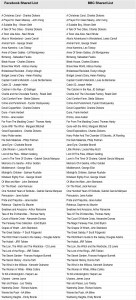
63 FB List titles on left, 63 BBC List titles on right.  This list contains exactly the same books, with titles edited.

63 FB List titles on left, 63 BBC List titles on right. This list contains exactly the same books, with titles edited.

You’ll notice some of the book titles are written slightly differently, which implies more editing by the clever meme maker (who’ll we’ll refer to as the Facebook Meme Maker -FMM) that adjusted the original BBC list.  (With the Facebook Meme’s “Harry Potter Series” entry, I just used the first Harry Potter book.  Same with “The Faraway Tree Collection.”  In a list of 100 books, it’s confusing to reference a series.)

So this table (click on it then zoom in to see better) contains the 63 shared titles.  That means 37 titles were deleted and new ones added by the Facebook Meme Maker.

Here are the remaining 37 titles from the Facebook meme next to the original 37 from BBC list (click to embiggen):

37 FB List titles on left, 37 BBC List titles on right.  The lists don't share titles.

37 FB List titles on left, 37 BBC List titles on right. The lists don’t share titles.

Seems like FMM preferred more American authors and books that were later adapted into successful movies.  Maybe FMM heard some rumor that the BBC was dissing American authors and readers and felt like putting some of her/his own favorites on the list.  Who knows?

But this meme has some of the great signs of a viral commodity:

1. The meme’s subject is elitist in that it says something about the user’s level of intelligence. (“What? You haven’t read War and Peace?!)  This fosters (usually friendly) competition amongst friends.

2. The meme has a whiff of injustice that stirs up indignance. (“How DARE the BBC say that?! GIMME THAT LIST!”)

3. Filling out / answering the meme doesn’t take much time.  “Put an X by the books you’ve read.”

4. 100 books is perfect.  A nice, big milestone number.  “16 Things” (which I filled out) didn’t take off on Facebook but “25 Things” did.  People gravitate toward milestone, lucky, and zero-ending numbers in this culture.  No-one will look at an “82 Books You Need to Read” list.  “100” grabs everyone’s attention.

The FMM probably saw the BBC list and wondered how many of the books she/he had actually read.  Out of curiosity, the FMM checked off which book titles were familiar.  Perhaps when the number of recognized titles were low, the FMM decided to add the ones she/he did in fact read.  What followed was an email or two, with bragging evidence attached, of course, to a few dozen friends on Facebook.  Voila!  A meme is born.

People who successfully ignore memes will be sucked into this one for the false academic quality of it.  It’s about traditional literacy; We all take the “How Well Read Are You?” measurement quite seriously.

I myself am trying to work on being better read.  With all the hype about how the internet and tv are melting our brains, this meme is a zinger.  It feeds all the fear surrounding the changes in our culture.  It will most likely take off and get so big that Snopes will have to post on it.

Now you know how memes like this start.  And you also know why I’m not going to be sucked in.  It’s a hoax created by a smart FMM who blended some pop culture news story from half-way across the world into a pride-ruffling insult that must be disproved immediately by the educated American masses.  Have fun with it if you like, but please don’t spread the indignant attitude.  Reading itself should be a positive and inclusive activity.

____________________________________

UPDATE 17 November 2010: Please read through the comments, there is a lot of new information scattered in there. Thanks.

UPDATE 22 November 2010: If you liked this article, you make like these others I’ve written about Facebook:
How IDs work in Facebook: http://www.purplecar.net/2010/02/facebookphishingscam/,

Dear Abby Talks About FB http://www.purplecar.net/2010/07/kids-with-multiple-facebook-profiles/,

Ack! My In-Laws are on FB: http://www.purplecar.net/2010/08/the-in-laws-and-facebook/

UPDATE: MARCH 1 2011 Comments on this post are now closed.

UPDATE: OCTOBER 24, 2012 This meme is still going strong. The list is changing a bit, but it is still basically the same. If you want to figure out why you or others waste so much time doing unproductive things like Facebook, you can check out this book: The Power of Habit by Charles Duhigg*.

*(affiliate link)
256 comments

When French Women Cook

Here’s a poem I wrote a few years ago using the only the book titles I could see from my seat at the cafe in the bookstore.

I added the punctuation.

On each line are all actual book titles (or part of book titles), including the first line of the poem.

Tell me what you think.

If anyone knows a word for this type of found/aggregate art, please let me know.

Please link me , in the comments, to any other similar type of works, especially your own. Thanks!

When French Women Cook


When french women cook

le cordon bleu at home,

celebrate

parisian home cooking!

Lulu’s provençal table:

made in marseille.

Entertaining

vineyard tales,

dinner after dark,

a kiss guide to wine.

Inspired gatherings,

simple french food:

the perfect mix.

you’re invited!

rsvp.

Cooking to hook up —

the way to a man’s heart.

4 comments